Announcement of New RecShareCLOUD Plans
Two new plans have been added to RecShareCLOUD, which was released in January 2020: the Standard Plan, which makes it easier and more affordable to get started, and the Enterprise Plan, which offers enhanced security and allows for customizations.
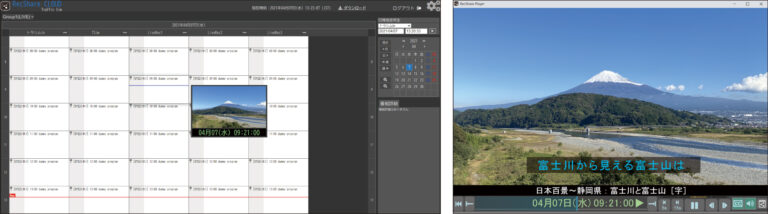
RecShareCLOUD uses a newspaper-style TV listings program guide UI, enabling intuitive operation even without a manual. When you hover over the program guide, thumbnails appear, allowing you to quickly find the scene you want while checking the playback position.
In addition, the web player requires no installation or plugins—anyone with Google Chrome can watch from anywhere nationwide, not just within the office.
For example, you can easily build workflows such as collecting camera footage from venues across the country for simultaneous recording, playback, and clipping; using it as a content bank for large-scale sports events; or recording broadcasts at all sites and reviewing them from multiple locations nationwide.
By leveraging the cloud, RecShareCLOUD flexibly solves challenges such as scaling based on the number of users, asset management, replacement, and maintenance.
Features
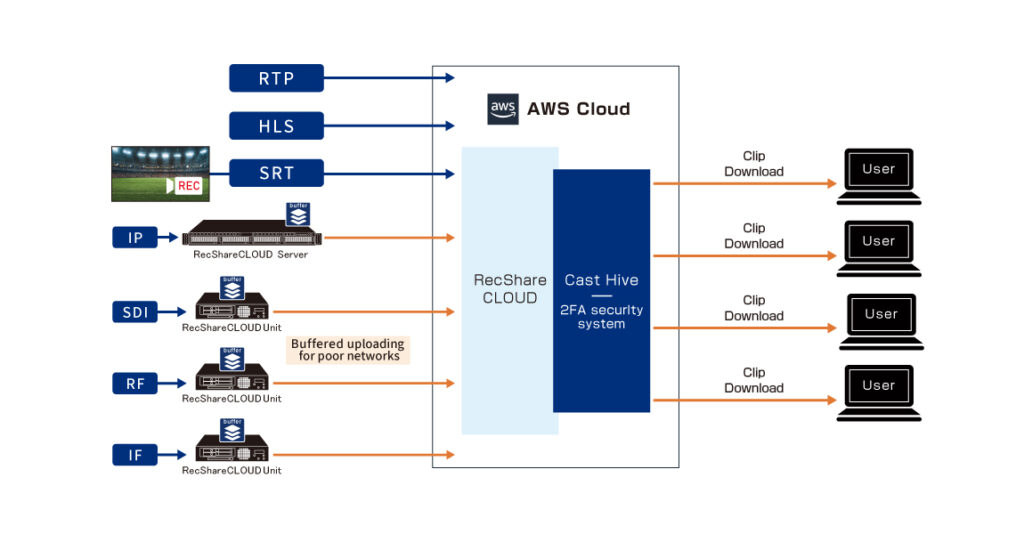
- Simultaneous recording of streams such as SRT / HLS / RTP-FEC / RTMP / Zixi can be completed entirely in the cloud. Cloud configurations require minimal setup and can be started quickly.
- In a hybrid cloud configuration, an on-premises unit retains a buffer and performs hash checks against cloud data, enabling strong resistance to packet loss during network or cloud failures. Uploading is possible even without expensive dedicated lines. (Verified in a proof-of-concept tethering environment using SONY PDW-850 × NEL MVE5000.)
- Thumbnails can be checked directly within the program guide UI, making it easy to search for playback points.
- The web player requires no add-ons, plugins, or dedicated software (Google Chrome supported).
- Anyone can easily create clips by specifying IN/OUT points while viewing thumbnails.
- Supports downloading to a local PC as well as uploading to any specified S3 bucket.
- Easy to expand and add users; scale up or down according to usage.
- Includes maintenance and hardware, reducing the burden of repairs, replacement, and asset management.
- Flexible contracts are available (monthly or yearly, etc.).
System Overview
Functions
- Simultaneous recording of various streams (SRT / HLS / RTP-FEC / RTMP / Zixi / RF / IF / SDI)
- Program guide display (full program guide / one-week program guide)
- Search by program name / program details
- Program guide integration (our format can be integrated free of charge; auto-generated if the program guide is included in the stream)
- Trick play (frame advance/reverse / –30, –15, +15, +60 second jumps / playback speeds: 1.5×, 2×, 5×, 10×)
- TS download / MP4 download / S3 upload
- Screen capture
- Channel grouping
- Granting permissions for download / access groups
- Switching between multiple affiliated organizations
- Various settings (user logs / user management / channel group settings / announcements editing / MP4 watermark settings / channel settings / system settings / personal settings / help / feedback)
Items that can be displayed and operated differ between administrators and users.
Screen images