RatingTracker is a data analysis / marketing analysis service built on the motto “Make data analysis easier and clearer.”
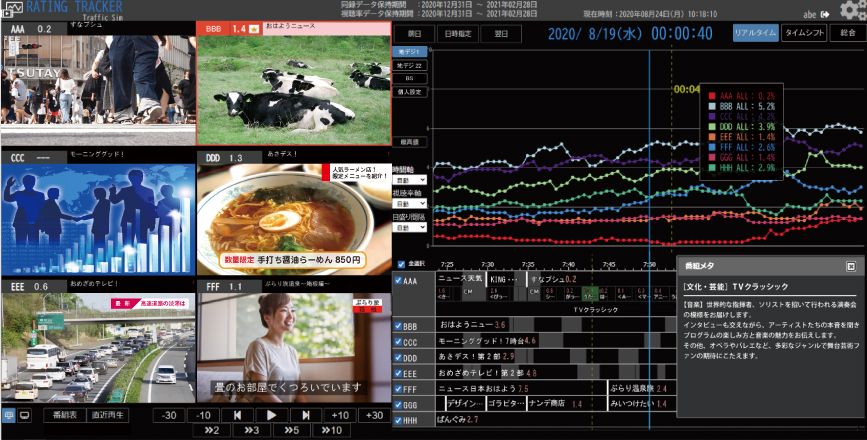
By linking simultaneously recorded video and audio with user-prepared data (such as metadata) and displaying them together in a multi-view layout, you can review all necessary information on a single screen without switching between multiple systems or services.
It also includes many convenient and search functions, enabling anyone to perform data analysis and marketing analysis easily. It is a useful tool for people involved in TV production and operations as a basis for considering “how to improve the numbers.”
In recent years, environments have expanded beyond TV, allowing individuals to freely live-stream on social media and other platforms. RatingTracker is preparing to visualize the “momentum” of X and various live streaming solutions in graph form, enabling visibility and comparison “against social media” as well.
Features
- Simultaneously records multiple broadcast/camera signals and allows you to view additional data (metadata, etc.) on the same screen along with the multi-view display.
- Centralizes video and data for convenient data analysis and marketing.
- Supports playback and searching from a familiar newspaper-style program guide (search by program name / program details / meta information) and graph scale changes.
- Includes a wide range of functions such as announcements display, jump to maximum value, trick play (fast forward, frame advance/reverse), MP4 download, and more.
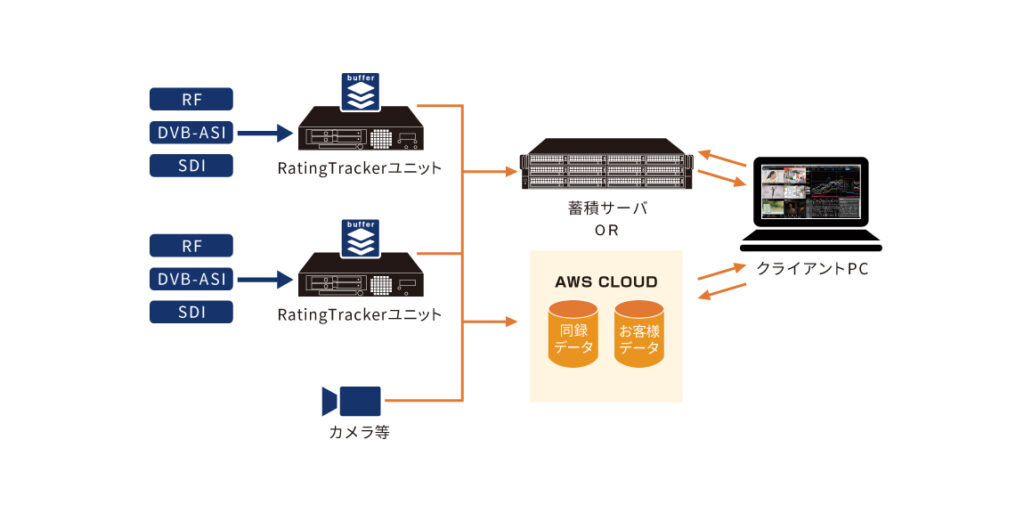
- By providing buffering in the RF/IF reception unit, data loss can be suppressed even if a line failure occurs.
System Overview
Functions
- Announcements display (announcements / display of programs with hidden ratings)
- Program guide display (full program guide / station-specific one-week view)
- Multi-view display (6 screens / 1 screen)
- Trick play (frame advance/reverse / ±30 sec, ±10 sec jumps / playback speeds: 2×, 3×, 5×, 10×)
- Jump to peak point
- Ratings display (change type in a matrix view)
- Metadata display
- MP4 download
- Various settings
Administration / Settings (Examples)
- User logs
- Mail & alarm settings
- Channel group settings
- Reference storage assignment settings
- Unit switching
- Watermark settings
- Help
- Initial screen settings
- Personal settings
- Announcements editing
- User information
- Feedback
Items available for display and operation differ between administrators and users.
Client PC Operating Environment
| OS | Windows10 Pro |
|---|---|
| CPU | Core i5 or higher |
| Memory | 4GB or more |
| HDD | 60GB or more |
| Resolution | 1920×1080, 1600×900 |
| Browser | Google Chrome |
Screen Images