
Solution
We built a footage clip sharing system on a cloud environment for five Tokyo commercial broadcasters to support the “Lausanne Winter Youth Olympics.”
Challenges & Goals
- A short lead time required rapid system deployment
- Desired short-term use over several months, not long-term operation
- Preferred SaaS-based service rather than purchasing a system
- Wanted an intuitive, user-friendly system anyone can operate
- Wanted to prevent data loss caused by network failures or similar issues
- Wanted to operate at as low a cost as possible
Benefits of Using RecShareCLOUD
- System can be deployed in a short time
- As a SaaS-based service, it can be used only for the required period (※)
- Adopts a familiar program schedule UI, designed to be intuitive without a manual
- On-premises hardware with cloud-side hash verification prevents data loss
- System configuration can be flexibly scaled up or down based on usage
Taking these challenges, goals, and deployment benefits into account, we proposed building RecShareCLOUD.
※ Available for use on a monthly basis.
Lausanne Winter Youth Olympics Architecture
The system is composed of an on-premises HW section, a footage download section, a live editing section, and a live distribution section.
Transcoding is performed on the on-premises HW to generate proxy video and thumbnails, reducing data transfer during preview and playback position searches.
Since the source data is also recorded, both TS format and MP4 format are supported for download.
Additionally, HLS generation functionality was added to support live distribution and live editing use cases as requested by the customer.
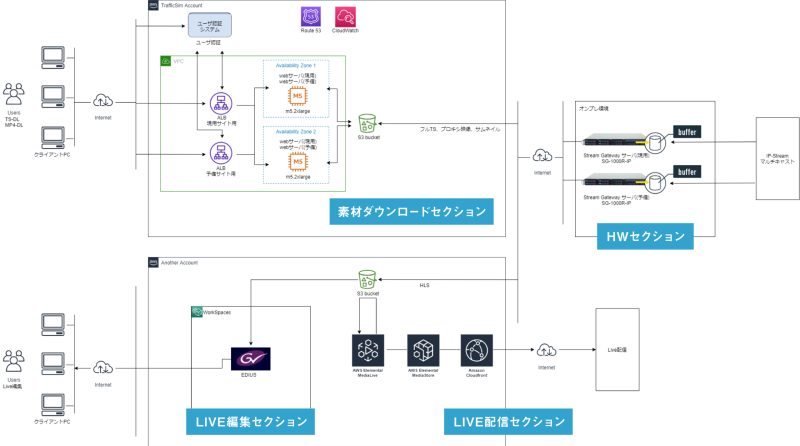
Cloud Recording Configuration
Three circuits were selected from IPVandA lines and the following data was recorded to the cloud:
- For footage download (IPVandA 25Mbps)
- For transcoded proxy (2Mbps)
- For thumbnails (0.5Mbps)
- For live distribution HLS (2Mbps)
※ IPVandA: IP (Internet Protocol) VandA(Video and Audio)
RecShareCLOUD Operation Flow
Footage Search Flow
1: User searches for the desired segment from the program schedule UI
2: Preview in the web player
3: Specify the download range
4: Execute download
5: Edit file on editing workstation
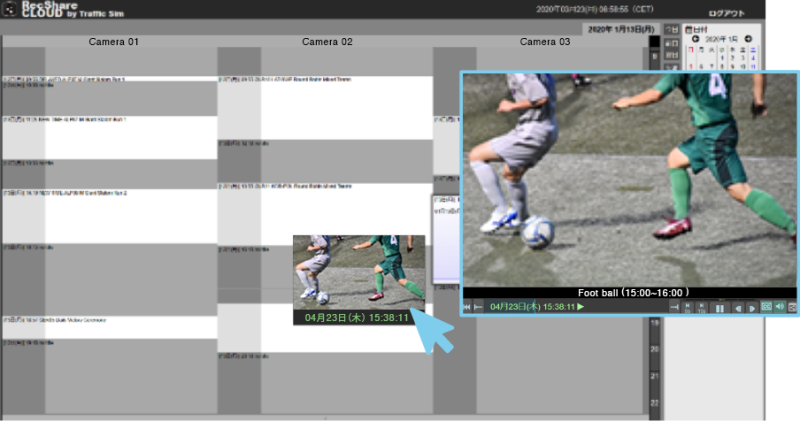
On the program schedule, hovering the mouse displays thumbnails in sequence, enabling intuitive searching of target segments without fast-forwarding or rewinding.
Simply browsing the schedule intuitively allows you to find the desired segment.
Simply clicking the desired segment launches the web player and begins playback immediately.
※ No add-ons, plugins, or dedicated software required (Google Chrome compatible)
※ Program schedule supports full-circuit view and per-circuit weekly view
※ Chase playback also supported
By using thumbnails for searching and proxy video for preview, data transfer is kept to a minimum, achieving cost savings.
Furthermore, the program schedule is linked to the continuously updated distribution schedule and always reflects the latest information.
RecShareCLOUD Operation Flow
Download Flow
1: User searches for the desired segment from the program schedule UI
2: Preview in the web player
3: Specify the download range
4: Execute download
5: Edit file on editing workstation
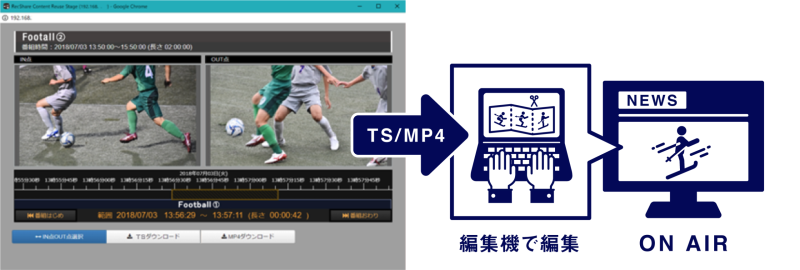
Download Function
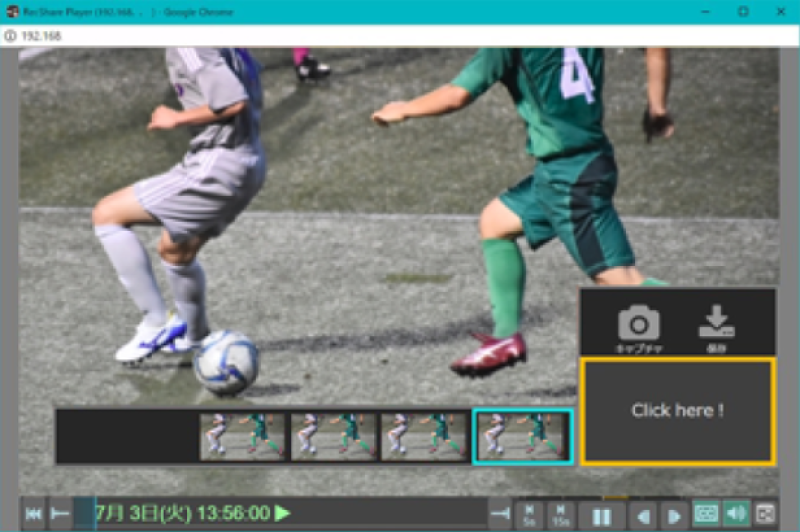
Capture Function
Clicking “Click here” displays a list of captured thumbnails.
Simply select the video you want to save, and capture saving is performed easily.
Future Challenges and Outlook
As customers use RecShareCLOUD, we have received various requests.
Some have already been addressed with fixes and releases.
Enhanced Search Functionality
Search functionality by program name and program details is currently under development.
We are also exploring search using machine learning-based athlete face recognition and object detection.
HLS Recording and Download Support
By configuring playlists and program schedule APIs, HLS can now be recorded simultaneously from a CDN.
In addition to TS and MP4, downloading HLS in ZIP format is also supported.
This makes it possible to retrieve and verify m3u8, aes.ts, key files, and more for a target time when a failure occurs.
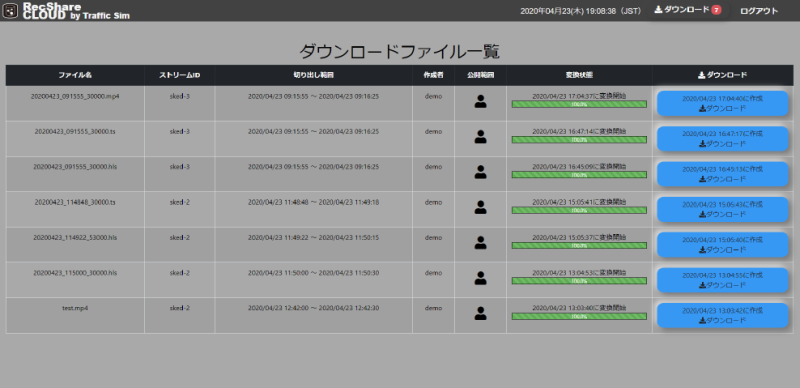
Download Queue Function
Previously, the next download could not be executed until the current one was complete.
Now, download reservations are queued in a list and executed automatically.
This allows multiple downloads to be prepared in advance and retrieved all at once later.
RecShareCLOUD Overview
RecShareCLOUD is a service that accepts various input signals — including IP, RF, IF, SDI, HLS, and SRT — and records them to the cloud (※) while transcoding.
By placing hardware at the receiving station, high reliability is ensured even during network or cloud failures.
Previously, failures could cause upload interruptions and data loss. This risk has been reduced by adding a buffer to the on-premises HW and performing hash checks against the cloud.
The service is provided as a SaaS solution that includes HW costs, system usage fees, maintenance, and AWS usage fees, with flexible terms ranging from monthly to long-term use.
The UI adopts a program schedule interface resembling a newspaper TV listing. Authorized users can view thumbnails by hovering the mouse over the schedule and intuitively locate the desired segment.
The web player requires no installation and supports viewing, downloading (TS / MP4 / HLS), and capture using Google Chrome alone.
By leveraging the cloud,
- Expanded recording duration
- Archiving of older data
- Increased number of simultaneous viewing users
these operational challenges can also be flexibly addressed.
※ Recording: The act of recording broadcasts or footage.